> ## Documentation Index
> Fetch the complete documentation index at: https://leetcode-py.wisl.dev/llms.txt
> Use this file to discover all available pages before exploring further.
> ## Agent Instructions
> leetcode-py is a Python LeetCode practice environment generator with one CLI: lcpy. It is not a service or platform.
> Each problem is a directory under leetcode/ with README.md, solution.py, test_solution.py, helpers.py, and playground.ipynb. lcpy gen creates them from JSON templates bundled with the package.
> Examples are backed by tests; copy them verbatim.
# Problem creation
> Add problems end to end with an AI assistant, from a one-sentence prompt to generated, tested content.
The repo ships skill specs that let an AI coding assistant (Claude Code,
Cursor, GitHub Copilot Chat, Amazon Q, or any IDE assistant with repo
context) add new LeetCode problems end to end. You describe the problem in
one sentence; the assistant scrapes, templates, generates, implements the
optimal solution, and verifies. Human intervention stays minimal: the
prompt, and a review of the result.
## Set up the context
For best results, have these files in the assistant's context:
* [`.claude/skills/problem-creation/SKILL.md`](https://github.com/wislertt/leetcode-py/blob/main/.claude/skills/problem-creation/SKILL.md):
the complete creation workflow
* [`.claude/skills/test-quality-assurance/SKILL.md`](https://github.com/wislertt/leetcode-py/blob/main/.claude/skills/test-quality-assurance/SKILL.md):
test enhancement and reproducibility checks
* [`.claude/CLAUDE.md`](https://github.com/wislertt/leetcode-py/blob/main/.claude/CLAUDE.md):
code standards and testing patterns
## Ask for a problem
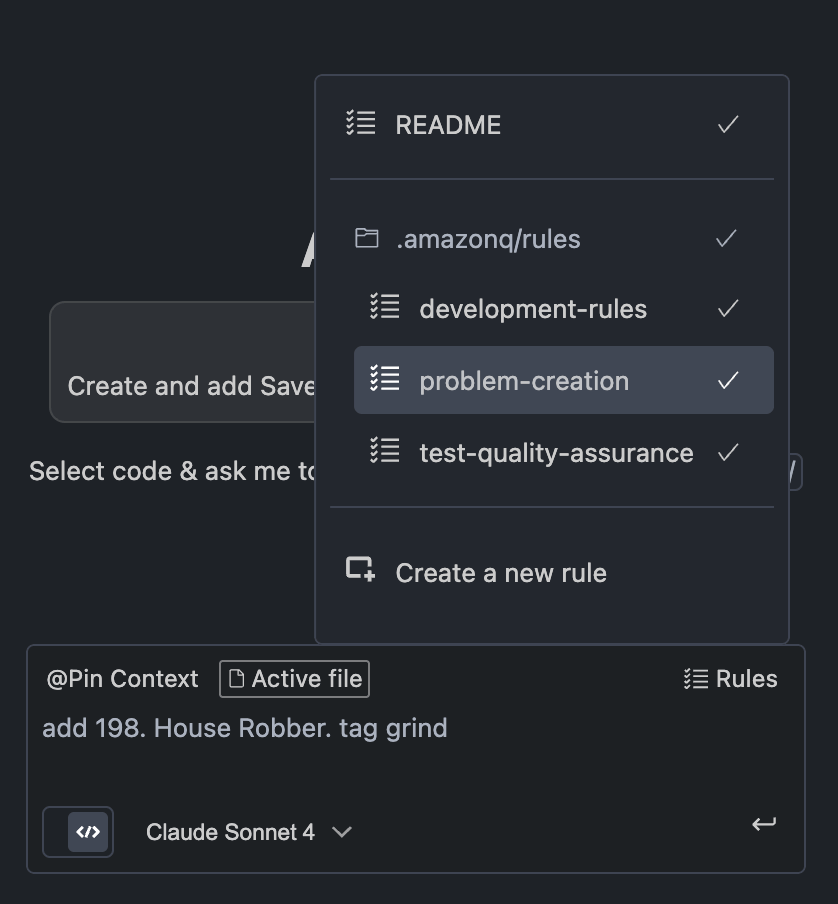 Prompts that work:
```text theme={"theme":{"light":"github-light","dark":"github-dark"}}
Add problem 198. House Robber
Add problem 198. House Robber. tag: grind
Create problem 70. Climbing Stairs with grind-75 tag
```
Include the problem number and title; adding a tag puts it in a collection.
## What the assistant does
1. Scrapes the problem data from LeetCode
2. Transforms it into the JSON template format, images included
3. Creates `json/problems/{problem_name}.json`
4. Updates `tags.json5` with the requested tags
5. Generates `leetcode/{problem_name}/` with the full problem structure
6. Runs the lint checks, iterating from step 3 until everything passes
Prompts that work:
```text theme={"theme":{"light":"github-light","dark":"github-dark"}}
Add problem 198. House Robber
Add problem 198. House Robber. tag: grind
Create problem 70. Climbing Stairs with grind-75 tag
```
Include the problem number and title; adding a tag puts it in a collection.
## What the assistant does
1. Scrapes the problem data from LeetCode
2. Transforms it into the JSON template format, images included
3. Creates `json/problems/{problem_name}.json`
4. Updates `tags.json5` with the requested tags
5. Generates `leetcode/{problem_name}/` with the full problem structure
6. Runs the lint checks, iterating from step 3 until everything passes
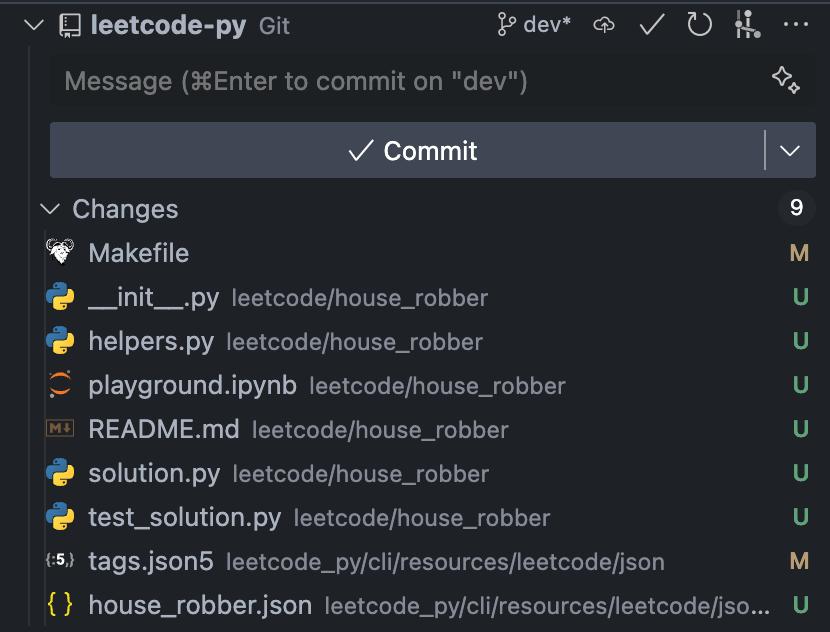 Step 5 produces real content under `leetcode/{problem_name}/`: the full
[six-file layout](/practice/problem-anatomy) with the README description,
helpers, playground, and tests, all from the JSON template.
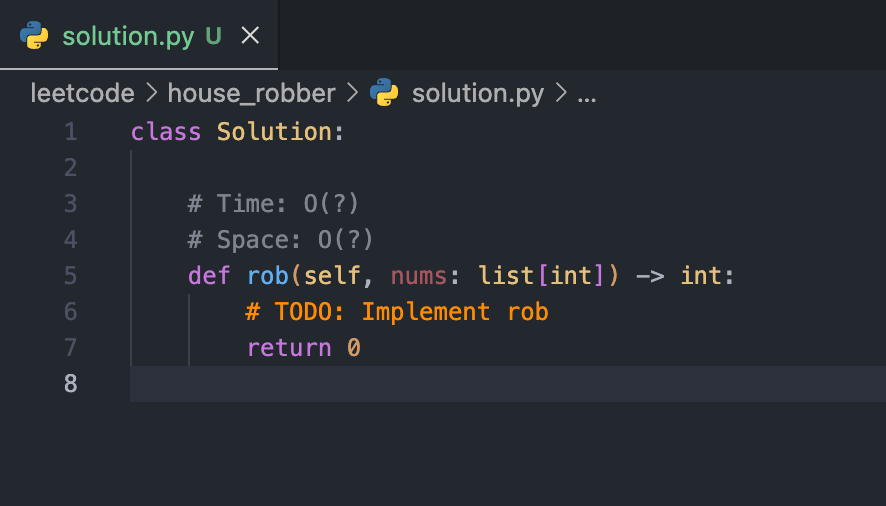
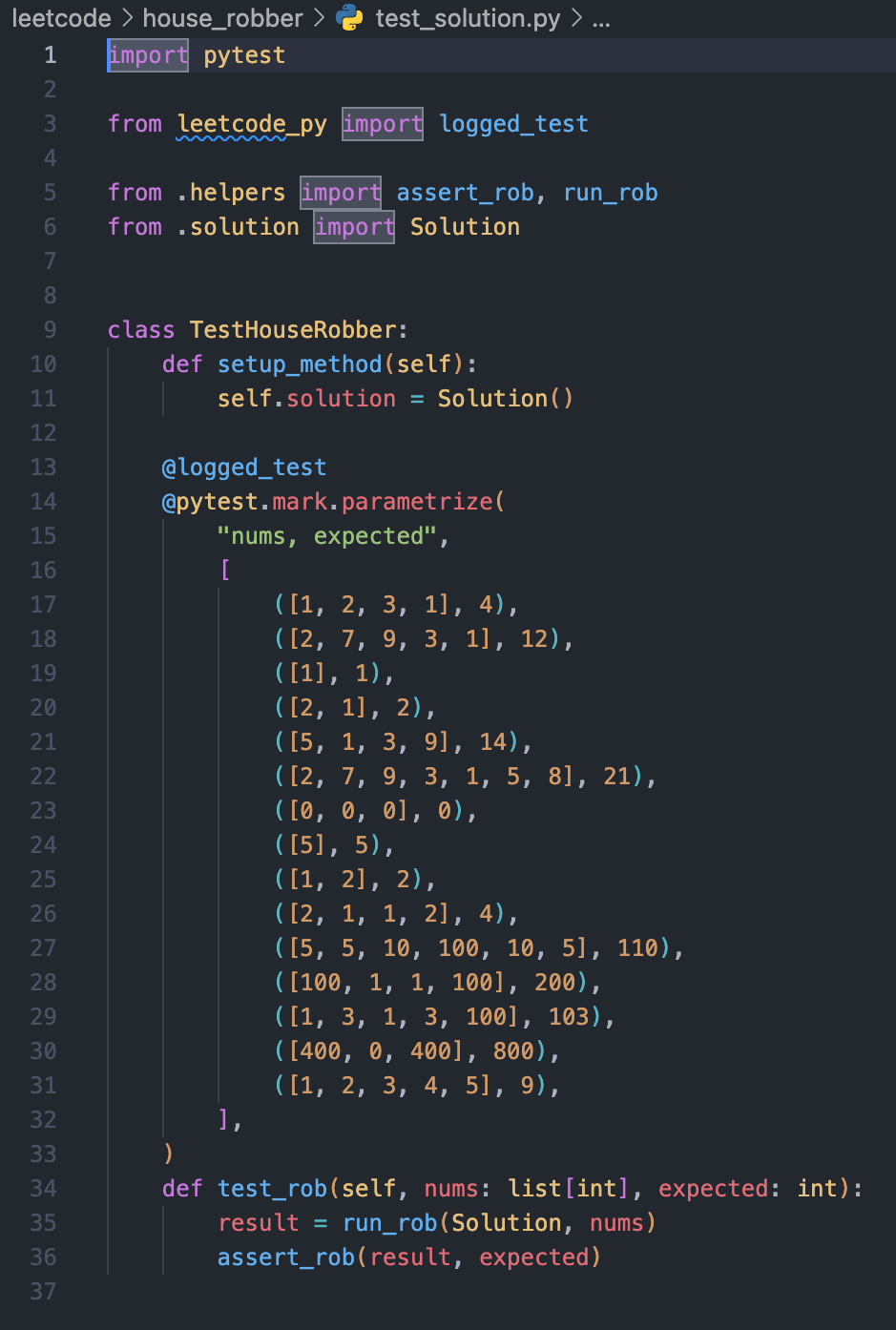
The generated `solution.py` arrives as a typed stub with a `TODO`, and
`test_solution.py` ships parametrized cases:
Step 5 produces real content under `leetcode/{problem_name}/`: the full
[six-file layout](/practice/problem-anatomy) with the README description,
helpers, playground, and tests, all from the JSON template.
The generated `solution.py` arrives as a typed stub with a `TODO`, and
`test_solution.py` ships parametrized cases:
 ## Implement and verify
The assistant then implements the optimal solution in `solution.py` (one
`Solution` class) and runs quality assurance per the test QA skill: tests
pass, at least 12 cases, and the suite reproduces after a regenerate and
restore cycle.
```bash theme={"theme":{"light":"github-light","dark":"github-dark"}}
bake p-test -p house_robber
bake check-test-cases -t 12
```
Generated test cases are a starting point, not gospel. The assistant
verifies expected values, and so should you before trusting a suite.
## Batch creation
`/batch-problem-creation [count]` (default 5) loops the whole workflow over
the next problems in the roadmap lists:
```bash theme={"theme":{"light":"github-light","dark":"github-dark"}}
uv run python .claude/.dev/next_problem.py # picks the next problem
```
The picker skips known unscrapable problems (premium, API issues), which
live in `.claude/.dev/problem_lists/unscrapable.py`. Failed problems are
logged and the batch continues; you get a summary with success rate and
retry candidates at the end.
## The pipeline, for reference
Everything above drives this machinery:
```text theme={"theme":{"light":"github-light","dark":"github-dark"}}
src/leetcode_py/cli/resources/leetcode/
├── json/
│ ├── problems/*.json # one template per problem (source of truth)
│ └── tags.json5 # collection membership
└── {{cookiecutter.problem_name}}/ # cookiecutter scaffold
|
| lcpy gen
v
leetcode// # README, solution, tests, helpers, playground
```
A problem template JSON carries the metadata (`problem_name`,
`problem_number`, `problem_title`, `difficulty`, topics, tags) plus the
rendered content for each output file: the README description, examples and
constraints, helper function sources, solution skeleton, test content, and
playground cells. Bulk generation for practice is covered in
[Collections](/cli/collections).
## Fix drift
`leetcode/` is never edited by hand. When `bake check-consistency` (or CI)
reports that `leetcode/` no longer matches the templates, edit the JSON
template, then regenerate:
```bash theme={"theme":{"light":"github-light","dark":"github-dark"}}
bake p-gen -p two_sum --force
```
To rebuild everything from scratch, `bake gen-all-problems` deletes
`leetcode/` and regenerates all problems (it asks first outside CI). Two
more skills automate the common fixes:
[`consistency-fix`](https://github.com/wislertt/leetcode-py/blob/main/.claude/skills/consistency-fix/SKILL.md)
(drift repair) and
[`update-tags`](https://github.com/wislertt/leetcode-py/blob/main/.claude/skills/update-tags/SKILL.md)
(collection membership changes).
## Implement and verify
The assistant then implements the optimal solution in `solution.py` (one
`Solution` class) and runs quality assurance per the test QA skill: tests
pass, at least 12 cases, and the suite reproduces after a regenerate and
restore cycle.
```bash theme={"theme":{"light":"github-light","dark":"github-dark"}}
bake p-test -p house_robber
bake check-test-cases -t 12
```
Generated test cases are a starting point, not gospel. The assistant
verifies expected values, and so should you before trusting a suite.
## Batch creation
`/batch-problem-creation [count]` (default 5) loops the whole workflow over
the next problems in the roadmap lists:
```bash theme={"theme":{"light":"github-light","dark":"github-dark"}}
uv run python .claude/.dev/next_problem.py # picks the next problem
```
The picker skips known unscrapable problems (premium, API issues), which
live in `.claude/.dev/problem_lists/unscrapable.py`. Failed problems are
logged and the batch continues; you get a summary with success rate and
retry candidates at the end.
## The pipeline, for reference
Everything above drives this machinery:
```text theme={"theme":{"light":"github-light","dark":"github-dark"}}
src/leetcode_py/cli/resources/leetcode/
├── json/
│ ├── problems/*.json # one template per problem (source of truth)
│ └── tags.json5 # collection membership
└── {{cookiecutter.problem_name}}/ # cookiecutter scaffold
|
| lcpy gen
v
leetcode// # README, solution, tests, helpers, playground
```
A problem template JSON carries the metadata (`problem_name`,
`problem_number`, `problem_title`, `difficulty`, topics, tags) plus the
rendered content for each output file: the README description, examples and
constraints, helper function sources, solution skeleton, test content, and
playground cells. Bulk generation for practice is covered in
[Collections](/cli/collections).
## Fix drift
`leetcode/` is never edited by hand. When `bake check-consistency` (or CI)
reports that `leetcode/` no longer matches the templates, edit the JSON
template, then regenerate:
```bash theme={"theme":{"light":"github-light","dark":"github-dark"}}
bake p-gen -p two_sum --force
```
To rebuild everything from scratch, `bake gen-all-problems` deletes
`leetcode/` and regenerates all problems (it asks first outside CI). Two
more skills automate the common fixes:
[`consistency-fix`](https://github.com/wislertt/leetcode-py/blob/main/.claude/skills/consistency-fix/SKILL.md)
(drift repair) and
[`update-tags`](https://github.com/wislertt/leetcode-py/blob/main/.claude/skills/update-tags/SKILL.md)
(collection membership changes).